Week 5
12/01/26
In our fifth week we began working on our web scrapers, which collect data from used car listings and automatically fill out the user form. First, we considered which two websites we wanted to support, with one being a Spanish website and one being a European or worldwide website. This was so that if a user is looking to import cars that are not in Spain, they can still check how much the insurance would cost. Since our dataset comes from Spanish insurance information, we felt it made sense to scrape a website based in Spain. We tried to see if we could scrape Spain’s biggest car sales websites, but none of them allowed web scraping. We also checked whether they provided APIs, but none were available. The only large marketplace we could reliably get data from was eBay through their Buy API, which is actually quite useful because it allows us to search for cars worldwide. This means that if someone was considering importing a car into Spain and looking at vehicles outside the country, they would still be able to do that. The only issue was that there were not many listings located in Spain, and not all of them were structured consistently.
So we decided to look at alternatives such as dealerships in Spain for more detailed information. We came across caroutlets.es, which is a medium-sized dealership based in Spain that does not restrict scraping their website, as long as personal information is not collected. This was ideal because it contained the vehicle information we needed. We also made sure to be respectful by not overloading their servers and keeping the scraping activity as minimal as possible.
These two sources provided good baseline examples to demonstrate that with a quick quote you can support both dealerships and marketplaces, while also showing that the system can be expanded further in the future.
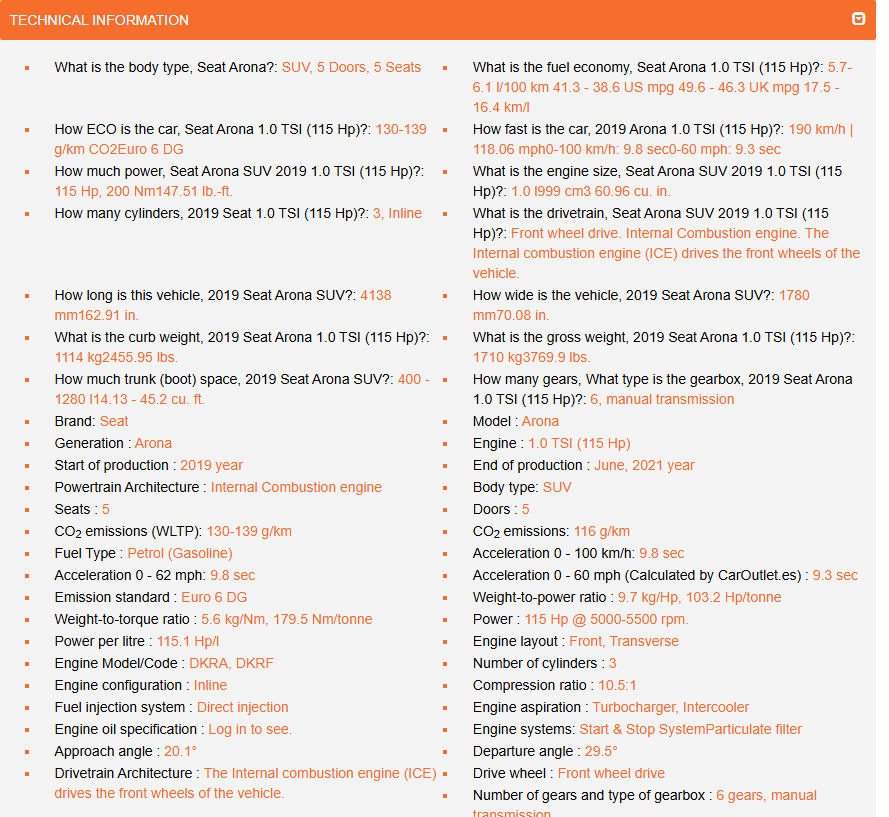
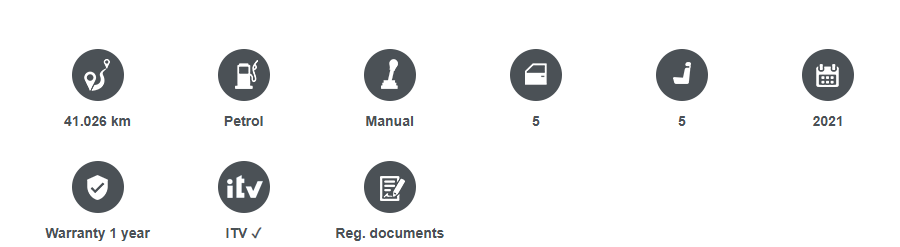
We made this first web scraper for the website caroutlet.es.
The main scraping logic starts by sending a simple GET with a chrome user agent header to avoid being blocked as a bot, then it looks for the specific icons in each listing that display the information of each of the key features needed to fill out our user form (fuel type, registration date, doors). After extracting the informations from the icons, it moves on to the technical specifications section of the listing to extract any necessary features that were not included with the icons e.g. length and weight. The scraper also uses regex to parse complex strings and ensure we only get the necessary information, for example length strings go from “3595 mm141.54 in” -> “3595” which we can then divide to get our length in metres.
 QuickQuote Developer Blog