Week 9
09/02/26
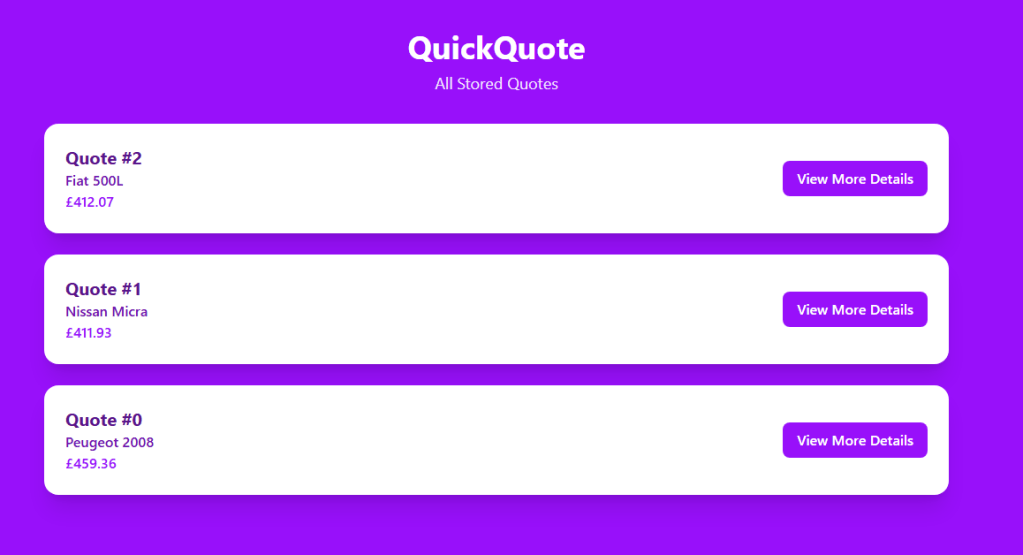
The final feature we decided to add to our website was the ‘view all quotes feature’.
This provided the user with a way to go back and view all their previous quotes in one page and the convenience of not having to go through the entire form process again to view previous listings they may have been interested in.
We use ‘useState’ to hold the quote data in memory and it also automatically refreshes the screen whenever it changes. ‘useEffect’ runs code the moment the page loads in this case, it updates the browser tab title and sends a fetch request to a local server to get the quotes. When the server responds, the code doesn’t save the raw data directly. Instead it maps through each quote and pulls out only the fields it needs like the quote ID, predicted price etc… and then restructuring them into a cleaner format before saving them into state.After this the page to re-renders with the new data. The UI then either shows a “no quotes available” message or a card for each quote, displaying key details like the vehicle and price. Each card has a button that uses ‘useNavigate’ from React Router to send the user to a dedicated page for that quote (/quote/{id}) without a full browser reload.
Machine Learning
In week 9 we finally built our finished ML model and replaced the placeholder model we had integrated into our website before
Because we had so many features and many of them were engineered, we had to spend a lot of time ensuring the data is fed into our finished model in the correct way, compared to our placeholder model which we did not need to manipulate the data in any way.
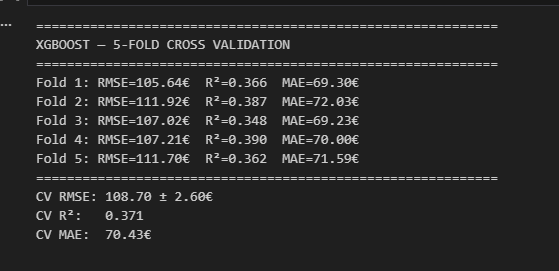
These were some of the results of our finished ml model.
 QuickQuote Developer Blog